Introduction
I built a tool I call sonify-health, which I use to assist with monitoring my home network. It can be used for monitoring all kinds of things passively. I thought it would be helpful to have a deeper write-up that covers why I built this and what purpose it serves.
Let’s talk about babysitting servers. I do this for a living right now, at scale. VMs by their thousands are my responsibility to hold up. A lot of the tech is pretty crufty, but mostly works and I’m the glue-on-retainer that repairs it when the system stops working. At home I have a handful of physical machines I keep up, and there are several dozen services I’m holding up with it. I’m approaching a low-tier, enterprise-grade IT setup.
Active Monitoring and Notifications
I imagine in the olden days, an administrator watched as logs scrolled by, or
perhaps they had some kind of health dashboard that they would keep their eyes
on. They might even hop on various machines and prod them with things like
top to see what’s going on. That doesn’t work when thousands of hosts are
involved. But I argue that even for smaller numbers, it’s still not a wise use
of time. Modern tooling has made it easier to do the right thing: Have the
system say what’s wrong with it.
This is one of our values: The system says what’s wrong with itself.
So now, as an industry, we have pages that hit our phones, and the pages breach our silence settings on our phones because the intention is that this wakes us up. When do we get paged? Well, a lot can go into that. We can configure what that event looks like. Disk exhaustion, service health status, queue sizes, page thrashing, or really anything we think means “time to go fix something”.
Awareness of Non-critical Behavior
Dashboards Demand Attention
But what happens when we don’t want to get woken up over some information about the system? What if CPU is elevated, but it’s not high enough to mean I should be paged? The answer to this is that we have to stare at a dashboard. Systems like Prometheus coupled with Grafana allow us to collect and aggregate a wealth of information about systems, and store them based on time of collection. We can watch changes virtually in real time, but also get a historic sense, and see trends or compare to like-systems. But the problem is that this means I have to stare at it. I love me a good information radiator, but my inbox piles up, my triage queue expands, and there’s always some shiny goal I’m supposed to be driving towards. Staring at a dashboard kind of takes away from that, and would make my simian mind smoother than it is. I’d be drooling at my desk.
This is one of our problems: The system demands our attention for problems that shouldn’t demand our attention (non-paging information).
Ambient Awareness
I feel like there’s something in the gestalt here that we share but I want to raise it to the surface consciousness. You might recall that when you can’t hear bird song in a wilderness area, it’s an indication that a predator might be nearby. I imagine all of us have had a situation where people are talking around us, and we’ve tuned them out. They don’t occupy our active attention. But we know people are talking around us and everything is fine. Then at some point it goes from friendly conversation to hostile, and it enters our consciousness. You weren’t paying active attention to the conversation and yet a part of you was paying enough attention to it to know when it deviated significantly.
Sonification
How can we provide awareness of system status without needing to invest active effort? We can look to Star Trek (or most any other science fiction media) for an example. But first, what I don’t mean: sometimes they have sounds being made to accompany some already visual information. A window popping up or something animating. If you’re old enough, you might remember people tricking out their Windows 3.x or 95 setups with this kind of behavior, and then nobody did it ever again. We’re not talking about those kinds of sounds.
I like to think even back to the original series of Star Trek. The bridge is full of these kinds of pings and boops and yawns and the systems just make these noises even if nobody is doing anything, but it’s not so invasive that it prevents the mind from thinking deeply or interfering with a conversation. There’s a rhythm to it, which is part of what makes it easy to tune out like birds chirping or cars passing by. I always imagined that there was information encoded in those sounds. Yeah it sounds like it’s just the same sounds over and over again but that’s because everything is fine. What happens when it’s not fine? What happens when it’s technically fine but the system is under stress or strain?
The act of taking information and encoding it into audio (generally via arbitrary sounds and not spoken words) is called Sonification. It’s a rather wide area but most of the demonstrations you’ll find of it are people playing music from static data sets. It also includes less musical information though. A Geiger counter is one most of our ears have heard - that clicking sound that gets more rapid when the detector is close to a source of ionizing radiation.
Sonify Health
sonify-health is what I built to provide sonification from any source a
computer could take in. I manage a lot of systems, so I needed a way to declare
several instances that could coexist - so sounds shouldn’t be playing on top of
each other in such a way that one drowns out the other. I demand declarative
configuration, so everything needs to be able to go into a configuration file (a
relatively easy ask here). I want something that works for a general yes/no
health check (it’s healthy or unhealthy), as well as a gradient scalar (like
current CPU usage).
Data Model
The design is a heartbeat, which has a probe and notes.
The probe is a check - a command line invocation. It can be configured to be an
exit code with arbitrary assignments to each value. You can also have it look at
stdout and use that for a gradient value (like getting CPU percentage). In
both cases, the actual value the probe gets is used by the notes - so it’s not
just zero or non-zero in the case of exit codes.
The notes are just a list of notes played. Notes can be discrete or gradient.
A discrete note just gets played as-is. This maps cleanly to exit codes, which could be a healthy/unhealthy, but it could also be healthy/degraded/unhealthy - or any other arbitrary assignment you want. Then you select the “patch” to use - the patch being a sort of vectorized declaration of what the sound is.
Gradient notes work best with a normalized value (something between 0.0 and
1.0). You indicate two different patches for the note, and indicate what the
scaling lerp strategy is (so it need not be linear). In real time,
sonify-health can update the sound being played to correspond to something
between the two values, based on what the probe brought back.
Okay so that’s a lot of abstract words. Let’s take a look at an example of the UI.
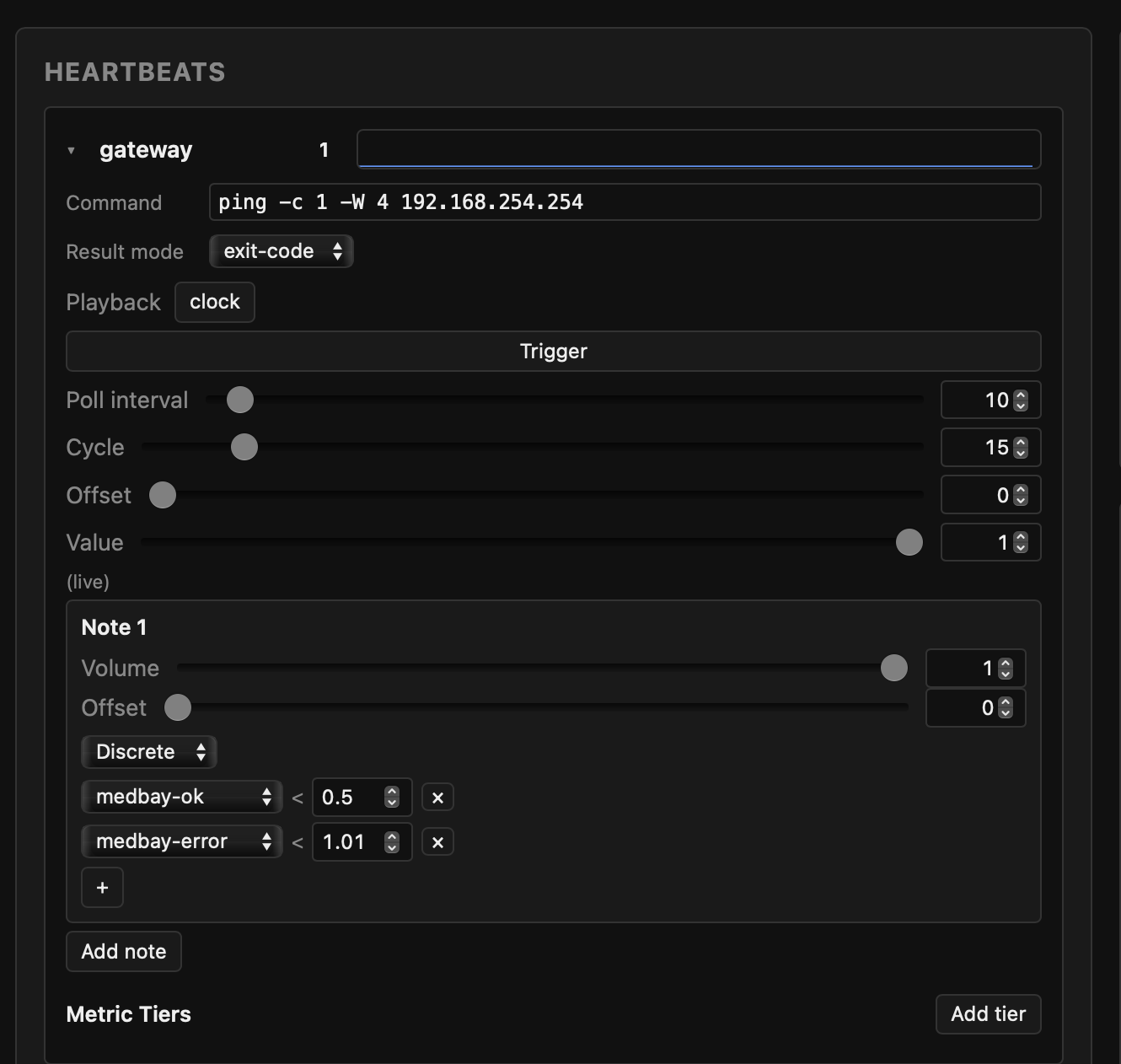
This shows off one of the heartbeats. Let’s do a breakdown of the UI to get an understanding of what goes into it. This is the gateway heartbeat, whose role is to communicate connectivity to the gateway host in my network. Some of this is kind of dry but it won’t leave any mysteries.
- Patch
- This isn’t in this part of the UI, but an important concept. A patch is essentially a vectorized declaration of a sound. There’s an entire UI for editing patches. This UI doesn’t edit them, but they are selected for various uses.
- Command
- This is just a ping to the gateway by IP. It has an aggressive timeout and only sends a single ping.
- Result mode
- We’re going with exit code. A successful ping exits with 0, and an unsuccessful ping will be non-zero. This fits right in.
- Playback
- This is set to
clock, which is short for wall clock. Basically instead of being in a loop where the loop begins when the service starts, it occurs according to wall clock time - repeating at every Nth second during a minute. This is an important thing to use if you plan on having more than one host with its own service that are all in the same audible distance. - Poll Interval
- How often we run the command.
- Cycle
- The duration of one full audio cycle in seconds - when using wall clock it should be evenly divisible by 60.
- Offset
- When in the cycle this heartbeat is played. This is another field
to help achieve temporal separation between multiple instances of
sonify-health. - Value
- This is the current value coming back from the command. Right now
it’s failing, because I took the screenshot when away from home. The value
can be changed here, and
sonify-healthwill treat it as an override - good for trying out various sounds, or perhaps suppressing an alert. The(live)indicates it is not overridden currently. - Notes
- This is where the heartbeat’s sounds are declared. A heartbeat will
have one or more notes.
- Volume: How loud this is played.
- Offset: The delay in seconds this note is played from the beginning of the cycle.
- Transition: This one is set to Discrete, but it could also be Gradient.
- Discrete: Discrete notes play a particular patch based on discrete values (generally integers, but could be ranges too). So in the case of 0 being success and 1+ being failure, we can set up two ranges (>= 0 and < 1 for one, and >= 1 for the other). The first patch is the success sound and the second is the error sound.
- Gradient: Gradient sounds are a continuous range. One or
more transition points can be set up. Each of these gets their own
patches, and a lerp strategy is declared between each patch. Since all
patches come from the same synthesizer machinery,
sonify-healthtransitions all properties between the two patches as the value changes between the ranges.
The patch editing section should feel rather familiar to anyone who has worked with synthesizers before. I haven’t really worked with synthesizers before, so I can’t say that with much authority. While it’s part of the data model, it’s also kind of immaterial what is exactly inside it. The only thing that really matters is that the sound a patch makes is entirely materialized from all of the fields that it uses. This allows us to transition between them. We also have the ability to create an override patch, which inherits from another patch but overrides selected fields.
sonify-health has several samples so I wouldn’t worry too much about trying to
craft your own patches if you just want to pick it up and go.
Life Under Sonification
Real Benefit
At the time of writing I have about 4 systems reporting in basic health, CPU, and GPU information, and I want to add one more. Those are kind of bland in a way. While I want to add more sophistication (like triage ticket “pressure”), they have actually done some real work for me in meaningful ways.
I’ve built a lot of home infrastructure I’m quite proud of, but it’s constantly being tinkered with and I’m my own beta tester for all of it. Sonified GPU usage has been incredibly helpful. I have several hosts contributing to LLM inference via their GPUs. One of them is a macOS host where GPU eviction is an ongoing struggle. Another problem is staggered usage (not all hosts are contributing to the work queue).
I’ve had long running report generations that delegate a lot of work to LLM inference. When generating these reports I expect the GPU of multiple systems to just be pegged. Instead, it’s kind of a rapid oscillation - exactly the staggered-usage pattern I mentioned. This has informed me of problems I wouldn’t have otherwise known - I would’ve thought that was just the speed of inference. That’s all from just hearing things while I’m doing something else. At some point I realize what I’m hearing is not what I should be hearing.
My work machine’s VPN connection isn’t flawless, and it can be really problematic when I think I’m trying to reach a host that is down vs. my VPN connection is just down or otherwise unhealthy. Hearing tell-tale chirps that mean the VPN is having problems has saved me from hours of work and possibly even destructive production operations (e.g. host is unresponsive, time to reboot the VM forcibly).
The Quirks
Occupying Audible Capacity
Okay but it’s a tool with tradeoffs so let’s talk about those too. These aren’t necessarily negatives in my mind, but things to be aware of or just quirks in general.
If I ever want to watch a video or something, I need to mute everything in the office first. I could easily put on headphones and turn things down enough to not be a distraction, but it’s also just enough friction to help me avoid the distracting stuff. In a similar vein, I don’t have light music I’m occasionally shopping for, because the same music just gets stale after a while.
Speaker Variance
I have about three different sets of speakers (which means two machines are sharing one via a mixer). I have onboard MacBook Pro speakers, Thunderbolt Display speakers, and a detached set with a small subwoofer. I’ve painfully tuned the “med bay” gradient sound to sound good on the MacBook Pro, but when it plays on the detached speakers, it just makes an aggravating ring not unlike mic feedback.
Precision
I don’t remember what each individual note represents, or which host is making the sound (in the case of multiple sources going through the same speakers). While I’m not totally lost when something is off, I’m not really instantly saying “Oh looks like VPN is down” unless it’s triangulating with other information. For example, I just hit a public website 3 seconds ago so I know it’s not my Internet connection that’s down. This narrows down which chirp is the error chirp. For some kinds of sounds, I don’t think I could reliably tell you between a 50% CPU utilization and 65%. But for major steps I think I can tell fairly well.
A Strange Draw
If I’m being intellectually honest, I feel like there is a bit of a cool factor. It gives me a sense that I’m more than just sitting in a busy office where the only sound is keyboard clatter. It’s a lot more organic even if the sounds I’m hearing are purely mechanical. As I write this, I’m away from the office, but I have
sonify-healthrunning locally. I like knowing it’s running in part because it tends to be informative to me in ways that are difficult to predict. I’m keeping the habit going where the sounds remain part of this pattern my mind just expects to be present, and I seem to notice it when it’s not present.
Future Work
For a feature for sonify-health, I want to see it be able to poll the setup
from remote sonify-health instances so my physical presence isn’t required for
all hosts. This might involve more than just slurping in the data - I might
need an override layer that lets me adjust the offset of the remote sounds.
This would all be vectorized, not rasterized. So it’s not sending over a
waveform. It’ll be sending over patch data and the state of each heartbeat
poll.
I’d also like a lot more built in sounds and examples. I’ll try to generalize
some more command examples - that’s relatively easy for me to do. My sound
engineering capabilities are quite limited though, and the examples I have
currently arguably took more of my time to build than sonify-health’s
code base itself. LLMs are kind of poor helpers for this kind of work. It will
probably require another person’s generosity.
I need to record some of the use so others can have an idea of how it sounds without having to install it.
Where Did Sonify Health Land?
I actually really like sonify-health and it’s one of my few creations that I’m
using on a daily basis. Much of how it works is very close to how I’d
envisioned (or enaudibled?). I have awareness of my systems a lot more directly
than I used to. I very rapidly know when something is off. I also have a
decent idea of how hard the hosts are working in my setup without me having to
look at a dashboard. I plan on expanding the use to cover additional things
like ticket pressure, service health, maybe even connect it to my agenda
somehow.
If you give it a spin, be sure to write a ticket if something doesn’t work, or you can shoot me an email if you’d like to chat about it outside of a GitHub discussion. Enjoy bringing a little bit of a sci-fi feel to your computing experience!